Dr.Fone promo codes and deals
-
DealEditor's Pick
Up to 29% Off Dr.Fone Full Toolkit
Annual and perpetual plans carry the full discount.
-
Deal
Up to 29% Off Dr.Fone Screen Unlock (Android)
The perpetual licence gets the full 29% off.
-
Deal
Up to 25% Off Dr.Fone Screen Unlock (iOS)
Both the annual and perpetual plans are 25% off.
-
Deal
Up to 13% Off Dr.Fone Data Recovery (iOS)
The full 13% is on the annual plan.
-
Deal
66% Off Dr.Fone Virtual Location
Applies to the monthly, quarterly and yearly plans.
-
Deal
Up to 34% Off Dr.Fone System Repair (iOS)
The deepest cut is on the annual plan.
-
Deal
Up to 33% Off Dr.Fone Phone Transfer
The saving is largest on the perpetual licence.
-
Deal
Up to 25% Off Dr.Fone WhatsApp Transfer
The annual plan has the biggest discount.
-
Deal
Up to 35% Off Dr.Fone Password Manager (iOS)
Covers the monthly, annual and perpetual plans.
-
Deal
Up to 64% Off Dr.Fone DocPassRemover
The monthly plan has the deepest cut, with 50% off the yearly and perpetual plans.
Saving Money on Dr.Fone Software
Dr.Fone has separate tools for recovering lost data, fixing phone problems, unlocking screens and transferring files between devices. You can buy just the tool you need or get them all together in the Full Toolkit.
If you need both System Repair (iOS) and Screen Unlock (iOS), a year of the Full Toolkit costs only five cents more than buying a year of each tool separately.
The Full Toolkit also includes Data Recovery, Phone Transfer, WhatsApp Transfer, Virtual Location, Data Eraser and Dr.Fone Basic. The Windows version covers five PCs instead of the two included with most individual tools, and comes with a free licence for Dr.Fone Air, which lets you mirror your screen and transfer files.
Monthly, Yearly or Perpetual?
Dr.Fone’s monthly, yearly and perpetual plans are often only a few dollars apart. With Phone Transfer, a full year costs $5 more than one month, and a perpetual licence costs $10 more than the year. Data Recovery (iOS) has a wider gap, with the yearly plan $15 above the monthly one.
If you only need to transfer data or recover files once, a monthly plan may be enough. Monthly and yearly subscriptions keep renewing until cancelled, while a perpetual licence is a one-time purchase.
Using a Dr.Fone Coupon Code at Checkout
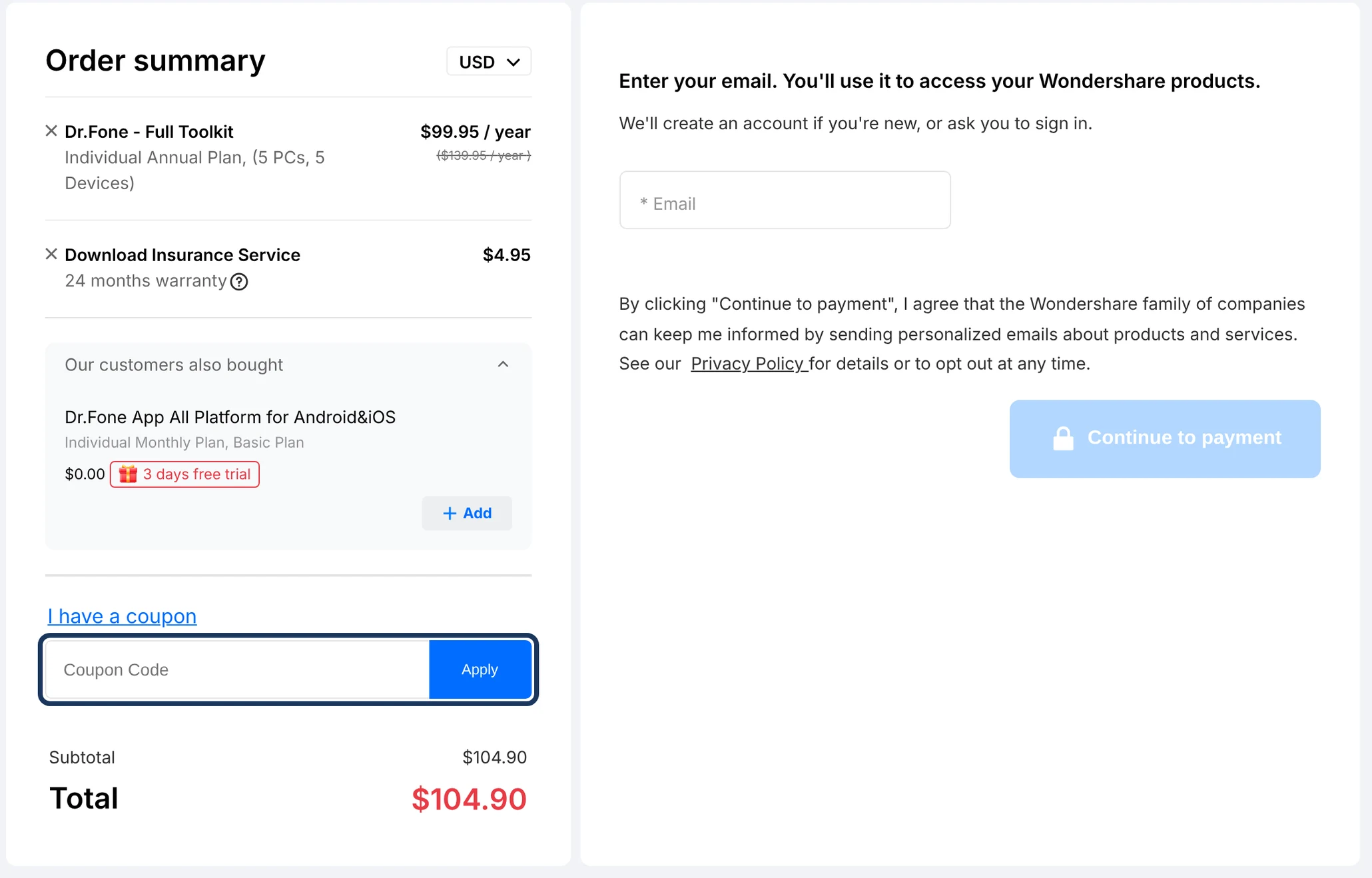
We tried the checkout for several Dr.Fone tools, and they all use the same Wondershare payment page. The coupon field isn’t visible until you click “I have a coupon” beneath your order summary on the left. That opens a “Coupon Code” box with a blue Apply button.
When a discount is applied, the savings appear on a Discount line above the Total. If the code isn’t accepted, the checkout doesn’t show an error message. The total simply stays the same, so you’ll need to look at the price to see if anything changed.
The Extra 10% Off Offer
The Full Toolkit has another discount worth checking. Beneath each plan is a box offering an extra 10% off. When we selected it on the annual plan, the whole discount came off in our cart.
Selecting that discount also added a three-day trial of the Dr.Fone App, which becomes a paid monthly subscription unless you cancel. Wondershare says the Toolkit discount stays even if you cancel the app trial.
Check the Price on Holiday Sale Pages
Dr.Fone sometimes leaves its holiday promotion pages online after the sale has ended. We found one still advertising a lower Full Toolkit price, but when we added it to our cart, the price had returned to the regular annual rate.
Phones, Computers and Licence Limits
Before buying a Dr.Fone plan, check how many phones and computers you’ll need to use it with.
Personal licences
Most individual tools cover up to five phones and can be used on two PCs. The Windows Full Toolkit allows five PCs.
Windows and Mac
Dr.Fone sells separate versions for each operating system. Choose the version that matches the computer you’ll connect your phone to.
Student discounts
Students pay half the listed regular price for a year of the Full Toolkit, and that price held when we checked the cart. That student licence covers two Windows PCs, requires student verification and is for individual, non-commercial use.
Business licences
Repair shops and teams can buy plans based on the number of phones they’ll work with on one computer. Plans start at six to ten devices and go up to unlimited devices, and each additional user needs another licence at the same price.
Finding the Right Tool for Your Phone
If you’re not sure which Dr.Fone tool you need, you can download the software without entering a credit card. The free version lets you explore some of the features before choosing a paid plan.
For example, Data Recovery can scan your phone and preview recoverable files, while WhatsApp Transfer lets you back up chats. System Repair also includes tools for entering recovery mode and resetting a device.
You’ll need the matching paid plan for features such as exporting recovered files, completing transfers or running a full repair.
Dr.Fone’s Refund Window and Renewals
Dr.Fone gives seven days from your first payment to ask for a refund, shorter than the 30 days offered on many other Wondershare products.
Turn off renewal at least 24 hours before your next billing date to avoid another charge.
Frequently Asked Questions About Dr.Fone
Does a discount carry over when a Dr.Fone plan renews?
Not in our checkout tests. With the extra 10% taken off the Full Toolkit’s annual plan, the next year’s renewal price remained at the regular rate. The discount applied to the first year only.
Can I enter a coupon code on a single tool, student plan or business licence?
Yes. We found the coupon field on individual tools such as DocPassRemover, the student Full Toolkit and a business Full Toolkit licence. You can enter a code on any of those orders, but that doesn’t mean every code will work.
Can I use a coupon code with the extra 10% discount?
You can enter one. The coupon field remained available when we selected the extra 10% offer, but that doesn’t guarantee both discounts will work together, since that depends on the code.