Wondershare promo codes and deals
-
Up to 79% Off
Up to 79% Off PDFelement Plans
-
Up to 69% Off
Up to 69% Off PDFelement for Education
-
Up to 60% OffNew
Up to 60% Off MobileTrans for iPhone 18
Get Deal Expires -
50% Off
50% Off Media.io Yearly Plan
Includes access to additional AI tools for free.
-
Up to 50% OffHoliday
Up to 50% Off Edraw Software Bundles
-
Up to 49% OffBundle Deal
Up to 49% Off Filmora Bundles
-
48% Off
48% Off on Edraw.AI Unlimited Version
-
39% Off
39% Off Recoverit Monthly Plan for Windows
-
Up to 37% Off
Up to 37% Off Filmora for Students
-
Up to 33% Off
Up To 33% Off Edrawmind Education
-
30% Off
30% Off MobileTrans for Education
-
30% Off
30% Off Recoverit Education Data Recovery
Recover unlimited documents, photos, videos, and emails from any storage device on Windows and Mac.
-
Up to 30% OffBundle Deal
Up to 30% Off Repairit Bundles
-
Up to 28% OffNew
Up to 28% Off Dr.Fone Plans
-
Up to 20% OffBundle Deal
Up To 20% Off UniConverter Bundles
Entering a Code at Wondershare’s Checkout
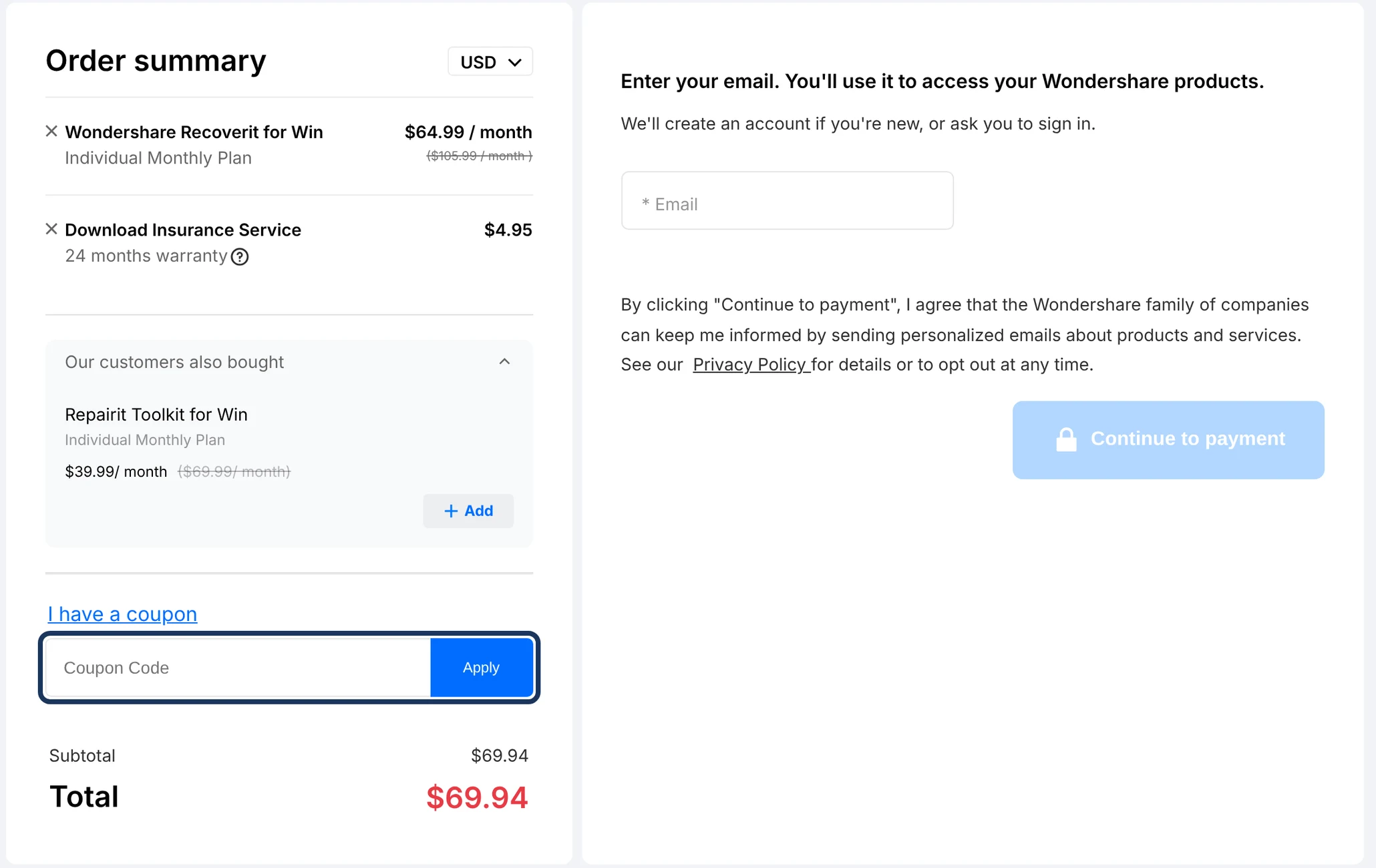
We went through Wondershare’s checkout for Filmora, PDFelement and Recoverit, and although each has its own store page, the checkout works the same way. There’s no coupon box on screen until you click the blue “I have a coupon” link under your order. Once you click it, you’ll see a field marked “Coupon Code” and an Apply button. It’s in the same place on mobile.
Each deal on this page is for one product or bundle, so pick the one that matches what’s in your cart. We also found that Wondershare doesn’t show an error when a code fails. If it’s accepted, you’ll see a Discount line added over the Total; if it isn’t, the price stays the same without any explanation. Checking the total is the easiest way to tell whether your code worked.
One thing worth checking before you pay is the Download Insurance Service. It costs $4.95 and was already added to our PDFelement and Recoverit carts, although we didn’t see it on a Filmora education order. You don’t have to buy it, and you can remove it using the X beside the charge. If you decide you want the insurance after placing your order, though, you can’t purchase it separately.
How to Save on Filmora Plans
Windows and Mac Prices
Filmora’s prices vary depending on whether you’re using Windows or Mac, so it’s worth comparing the plans before buying. When we checked, Windows annual plans were $49.99 for Basic, $59.99 for Advanced and $99.99 for Premium, with a perpetual licence at $79.99. Mac plans cost more across the board: $69.99 for Basic, $79.99 for Advanced, $119.99 for Premium and $99.99 for perpetual.
Advanced or Premium
The biggest difference between Advanced and Premium is what comes with them. Advanced includes 1,000 AI credits a month, while Premium gives you 2,000 and the full Creative Assets library of stock footage, music and templates. That library costs $99.99 a year on its own, the same as the entire Windows Premium plan. If you need those assets, Premium could save you money compared with buying them separately.
The Perpetual Licence
The perpetual licence may look like the cheaper option, but there are a few trade-offs. You get 1,000 AI credits once instead of every month, and the licence only covers updates to the major version you purchased, so moving to the next major release may cost extra. Annual plans include those upgrades, and any monthly AI credits left unused don’t carry over to the next 30 days.
Referral Points
Filmora also offers a referral program that can help with future purchases. You earn 100 points when a friend signs up through your link, and those points can be exchanged for AI credits, discounts or free licences in the Rewards Center. The points expire after 180 days.
PDFelement Plans and Platforms
PDFelement is Wondershare’s PDF editor, sold as a single-platform plan for Windows or Mac, or a cross-platform plan that covers both. When we checked, the yearly cross-platform plan was $89.99 against $79.99 for one platform, so covering both systems cost only $10 more.
The 2-year plan was $109.99, about $55 a year, and it’s set to manual renewal, so it won’t charge you again on its own. The yearly plan keeps renewing until you cancel. The perpetual licence was $129.99 for PDFelement 13.
You can try PDFelement before buying, with a 14-day trial on Windows and 7 days on Mac, and no card needed. Files saved during the trial carry a watermark. On the Mac store, the plans also come with a tick box for a 7-day AI plan trial that renews at $39.99 a year.
Monthly or Yearly Billing
If you’re buying Recoverit or MobileTrans, take a look at the yearly price before choosing a monthly subscription. The difference is surprisingly small. Recoverit was $64.99 for one month or $74.99 for an entire year when we checked. That’s only $10 more for another eleven months, and there’s also a perpetual licence at $134.99.
MobileTrans follows a similar pattern, at $29.99 for one month or $39.99 for a year. If you only need either app for a single project, monthly billing might make sense. You can find a separate breakdown of Dr.Fone’s plans on our Dr.Fone coupons page.
Media.io is different, with its Premium plan at $27.99 a month or $13.99 a month when billed annually. That’s $167.88 upfront for the year, so the monthly rate is half as much, but you’re committing to twelve months. There’s also a three-day Premium trial, and if you don’t cancel before it ends, it renews at the annual price.
Windows, Mac or Both
A Wondershare licence doesn’t necessarily work on both Windows and Mac. Filmora, for example, sells separate versions, and buying one doesn’t give you access to the other. If you use both systems, the Windows and Mac bundle was $81.58 a year when we checked, down from $103.98.
If you accidentally buy the wrong version, you may be able to get a refund. Wondershare covers mistaken purchases when the software hasn’t been used and you’ve bought the correct version directly from the company. Recoverit also offers another option if you’re switching computers: you can contact support about a discount on the version for your new operating system.
Student and Education Prices
If you’re a student, check the Education tab before paying the regular price. Most Wondershare stores have one beside the Individuals tab, and the savings can be substantial. Filmora’s student plans were $19.99 monthly, $39.99 yearly or $49.99 for a perpetual licence when we checked. PDFelement’s yearly education plan was also $39.99.
Recoverit offered 30% off its education plans, bringing the prices to $41.99 for one month, $48.99 for a year and $90.99 for perpetual. MobileTrans also offered 30% off.
For most Wondershare products, you’ll need to verify your student status through Student Beans. EdrawMax and EdrawMind are different. They ask for a student email address and supporting documents instead. Education licences are tied to your Wondershare account, can’t be transferred and are meant for individual use, not commercial work.
Bundles That Pair Two Products
If you need more than one Wondershare app, check whether they’re sold together before buying them separately. Filmora had several bundles when we looked, including 42% off when paired with PixCut and 36% off with Filmstock. Pairings with DemoCreator, UniConverter and the Android app offered discounts between 22% and 29%.
There were savings on other products too. Repairit and Recoverit together cost $104.98 instead of $149.98, while UniConverter’s Windows and Mac bundle was $79.98. The discounts can be worthwhile, but only if you’ll actually use both products. Wondershare doesn’t always allow you to return just one part of a bundle, so it’s better to decide which apps you need before purchasing.
Team and Business Licences
One Licence per Person
If you’re purchasing Wondershare software for a business, don’t assume an individual plan can be shared. Filmora’s Basic and Advanced subscriptions are for one person, so each team member needs a licence.
Seat Discounts
Some products become cheaper when you buy multiple seats. In the team stores we checked, Recoverit and UniConverter offered 10% off for two users, 15% for three and 25% for five. Filmora’s team plan was $155.88 for one user, or $140.28 per person when purchasing two or more licences.
Flat Per-Seat Pricing
Not every team plan has volume discounts. PDFelement’s team perpetual licence and MobileTrans’s team plan cost the same per person regardless of the number of seats. The team stores also have forms for requesting quotes on larger orders. And if you’re comparing Filmora’s team and individual plans, there’s an important difference: the team licence allows company use but doesn’t include AI credits or Creative Assets.
The “Extra 10% Off” Tick Box
We noticed an extra 10% discount checkbox on some Wondershare store pages, but it isn’t quite as simple as taking another 10% off your order. On Recoverit, ticking the box lowered the first month’s price from $64.99 to $58.49. The discount applied to that first month only.
It also added a free trial of Relumi, a separate photo app, which starts charging $5.99 a week after three days unless you cancel. MobileTrans has a similar offer tied to a Dr.Fone app trial, while Filmora’s extra 10% comes with a 14-day Creative Assets trial that renews at $19.99 a month. These offers can save you money upfront, but check the trial terms before accepting them. Otherwise, the extra subscription could end up costing more than you saved.
Refunds, Renewals and Taxes
Most Wondershare products have a 30-day refund window from the first payment. MobileTrans, Dr.Fone, Recoverit, Repairit, Relumi and Media.io have a shorter seven-day window.
EU residents have a 14-day right of withdrawal, subject to the applicable conditions.
Duplicate purchases, optional add-ons bought by mistake, or technical problems that Wondershare support couldn’t resolve.
Changing your mind, using AI credits or letting a subscription renew without cancelling in time.
Cancel at least 24 hours before the next renewal to avoid another charge.
Go to Account Center, open My Orders and select Order History.
Refund requests must go through the store where you made the purchase.
Wondershare charges sales tax in some US states, and payment is by PayPal or credit card.
Frequently Asked Questions About Wondershare
Do I need a Wondershare account to see the deal price?
No. In our checkout tests, the discounted price appeared before we entered an email address. You can see what you’ll pay without creating an account first. When you complete the purchase, Wondershare creates an account using your email or asks you to sign in if you already have one.
Can I add a code to a student price?
You can enter one, since education orders use the same checkout as regular plans, but whether the discount applies depends on the code.
Is the Download Insurance fee discounted too?
No. When we applied the extra 10% discount to a Recoverit plan, it reduced the software price only. The Download Insurance Service stayed at full price.
What is the second price listed under my plan in the cart?
That’s the renewal price. If you’re buying a subscription at a discount, Wondershare shows when it will renew and what you’ll pay for the next term. That amount can be higher than today’s price, so it’s worth checking before you complete the order.